 Livescore
Introduction to Video Editing: Basic Concepts and Terminology
In this digital era, videos have become an integral part of our lives. From social media platforms to professional filmmaking, video content has taken center stage, capturing our attention and conveying powerful messages. Behind every captivating video lies the art of video editing.
Video editing is the process of manipulating and rearranging video footage to create a coherent and engaging final product. Whether you aspire to become a professional video editor or simply want to enhance your own videos, understanding the basic concepts and terminologies of video editing is essential.
CapCut, an online video editor, has developed various editing tools to help video editors in their process. This article will serve as your guide, taking you through the fundamental principles that underpin this creative and technical field.
Basic Concepts of Video Editing
Source: CapCut
- Timeline: The timeline is the foundation of the video editing process. It represents a linear sequence of video and audio tracks where you arrange and manipulate your footage. Each video clip and audio track is placed on the timeline in a specific order to create the desired sequence.
- Clips: Video editing begins with importing and organizing video clips. A clip is a segment of video footage that can range from a few seconds to several minutes in duration. Clips can be captured from various sources, such as digital cameras and smartphones, or downloaded from online platforms. These clips serve as building blocks in the editing process.
- Cutting and Trimming: Cutting and trimming involves removing unwanted sections from clips or adjusting their duration. Cutting refers to removing a specific part of a clip entirely, while trimming allows you to adjust the in-point (start) and out-point (end) of a clip. This process helps to refine the content and create a more polished final product.
- Transitions: Transitions are used to smooth the visual flow between two clips. They provide a seamless connection between scenes and can add stylistic elements to the video. Common transitions include fade-ins, fade-outs, cross dissolves, and wipes. By using transitions effectively, you can enhance the overall viewing experience.
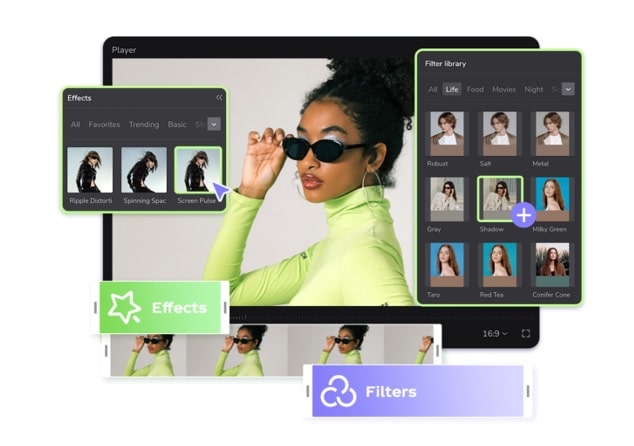
- Effects: Effects allow you to modify the visual appearance of your video clips. These can range from basic adjustments such as brightness and contrast to more complex effects like color grading, adding filters, or applying visual effects. Effects help to set the mood, tone, and style of your video.
- Titles and Text: Titles and text overlays are essential elements in video editing. They can be used to introduce a video, provide context, or emphasize certain points. Video editing software offers a variety of options to create and customize titles, including choosing fonts, sizes, colors, and animations.
- Audio Editing: Alongside video footage, audio plays a vital role in creating a compelling video. Audio editing involves adjusting volume levels, adding or removing background music, and syncing audio with video. By carefully editing the audio, you can enhance the overall quality and impact of your video.
- Collaboration: Video editing often involves collaborating with other professionals, such as directors, cinematographers, sound designers, and visual effects artists. Effective communication and teamwork are essential for achieving the desired creative vision and delivering a high-quality final product.
- Storytelling: Video editing plays a crucial role in storytelling. It involves arranging shots in a way that effectively conveys the intended message or narrative arc. By selecting the best shots, sequencing them logically, and establishing a rhythm, video editing helps shape the emotional impact and engagement of the video.
- Color Correction: Color correction ensures consistent and accurate colors throughout the video. It involves adjusting brightness, contrast, saturation, and hue to achieve the desired visual tone. Color correction can also be used creatively to establish different moods or atmospheres. You can also use the background remover to correct your video’s background.
- Continuity: Continuity ensures smooth visual and narrative coherence within a video. Editors maintain consistency in terms of camera angles, positions, and movements between shots. They also ensure that actions, props, and actors' roles remain consistent throughout different scenes unless intentional changes are made.
Terminology of Video Editing
- Frame Rate: Frame rate refers to the number of frames (individual images) shown per second in a video. Common frame rates include 24, 25, and 30 frames per second (fps). The frame rate affects the smoothness of motion in a video and is an important consideration when editing and exporting videos.
- Resolution: Resolution refers to the number of pixels in a video frame, typically represented by the width and height dimensions. Common resolutions include 1080p (1920x1080 pixels) and 4K (3840x2160 pixels). Higher resolutions provide more detailed and sharper images but also require more processing power and storage space.
- Aspect Ratio: Aspect ratio defines the proportional relationship between the width and height of a video frame. Common aspect ratios include 16:9 (widescreen) and 4:3 (standard). The aspect ratio determines how the video will appear on different screens and devices, and it is crucial to consider when editing and exporting videos.
- Keyframes: Keyframes are used to create animations and transitions within a video clip or effect. They mark specific points in time where you define changes in properties, such as position, scale, opacity, or rotation. Keyframes provide precise control over how a video or effect evolves over time.
- Rendering: Rendering is the process of generating the final video output after all the edits and effects have been applied. During rendering, the software processes the video and audio data, and the resulting file is saved in a specified format and quality. Rendering can be a time-consuming process, especially for complex and high-resolution projects.
Conclusion
Video editing is a skill that combines creativity, technical knowledge, and attention to detail. By understanding the basic concepts and terminologies of video editing, you can unleash your creativity and transform raw footage into compelling videos.
The concepts discussed in this article, including the timeline, cutting and trimming, transitions, effects, titles and text, audio editing, as well as the terminology related to frame rate, resolution, aspect ratio, keyframes, and rendering, provide a solid foundation for anyone venturing into the world of video editing. So grab your footage, dive into the world of video editing software, and let your imagination take flight as you bring your vision to life.